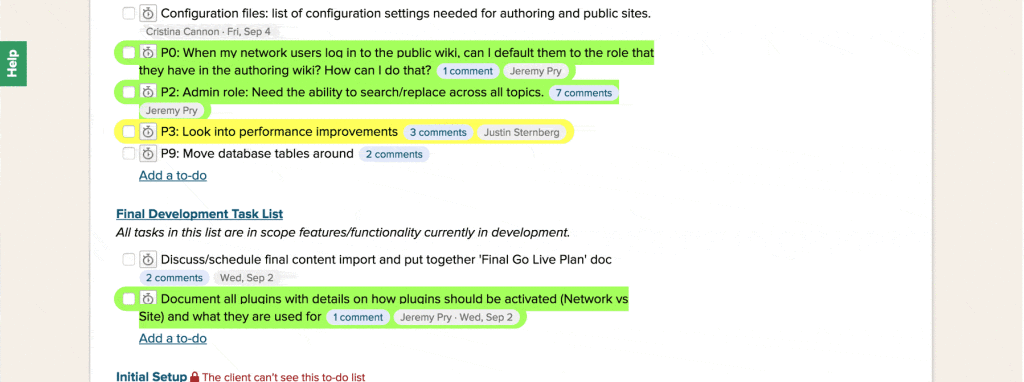
UPDATE 09-04-15: I created another bookmarklet that allows some UI elements for toggling Basecamp list display. Very handy for unruly projects, or trying to drag and drop that pesky task from one list to another.Basecamp classic showed a light yellow highlight under tasks assigned to me, but NEW Basecamp seems to have lost that UX feature. If you want a quick way to toggle those highlights, drag the bookmarks below to your bookmark bar. Click on it when viewing a task list, and it will highlight tasks assigned to you in new Basecamp.
%27;css%20+=%20%27.BC-highlight-me%20{%27;css%20+=%20%27background:%20rgba(255,%20255,%2092,%200.4);%27;css%20+=%20%27border-radius:%2015px;%27;css%20+=%20%27padding:%205px%208px%205px%2010px%20!important;%27;css%20+=%20%27margin-left:%20-10px%20!important;%27;css%20+=%20%27margin-bottom:%207px;%27;css%20+=%20%27}%27;css%20+=%20%27%27;$(%20%27head%27%20).append(%20css%20);};app.getToDos%20=%20function()%20{return%20$(%20%27[data-avatar-for-person-id=%22%27+%20app.me.id%20+%27%22]%27%20).parents(%20%27li.todo%27%20);};app.triggerEvent%20=%20function(%20$todos%20)%20{if%20(%20$todos.length%20)%20{var%20ids%20=%20$todos.parents(%20%27.todolist%27%20).map(%20function()%20{%20return%20$(%20this%20).data(%20%27recordingId%27%20);%20}%20).get();$(%20%27body%27%20).trigger(%20%27basecamp_tasks_highlighted%27,%20{%20%27type%27%20:%20%27me%27,%20%27ids%27%20:%20ids%20}%20);}};if%20(%20window.jQuery%20)%20{$%20=%20window.jQuery;app.highlightMe();}%20else%20{jq%20=%20document.createElement(%27script%27);jq.src%20=%20%22https://ajax.googleapis.com/ajax/libs/jquery/2.1.4/jquery.min.js%22;document.getElementsByTagName(%27head%27)[0].appendChild(jq);setTimeout(%20function()%20{jQuery.noConflict();$%20=%20window.jQuery;app.highlightMe();},%20500%20);}window.BC3HighlightMe%20=%20window.BC3HighlightMe%20||%20app;})(window,%20document);” target=”_blank”><span title="Basecamp 3 Version">BC3: Highlight Me</span> ^ drag to your bookmark bar.
Here’s another bookmarklet that allows you to search for a user and have all their tasks highlighted (Useful for highlighting all tasks assigned to a coworker).
=%200;};app.init%20=%20function()%20{app.search_name%20=%20prompt(%20%27Search%20Name:%27%20);var%20$search%20=%20app.highlightUser();var%20number%20=%20false%20!==%20$search%20&&%20$search.length%20?%20$search.length%20:%20%27No%27;alert(%20number%20+%20%27%20tasks%20found%20for%20%27+%20app.search_name%20+%20%27.%27%20);app.triggerEvent(%20$search%20);if%20(%20!%20app.initDone%20)%20{window.setInterval(%20app.highlightUser,%201500%20);app.addStyles();}app.initDone%20=%20true;};app.addStyles%20=%20function()%20{var%20css%20=%20%27%27;css%20+=%20%27%27;css%20+=%20%27.BC-user-highlight%20{%27;css%20+=%20%27background:%20rgba(164,%20255,%2092,%200.42);%27;css%20+=%20%27border-radius:%2015px;%27;css%20+=%20%27padding:%205px%208px%205px%2010px%20!important;%27;css%20+=%20%27margin-left:%20-10px%20!important;%27;css%20+=%20%27margin-bottom:%207px;%27;css%20+=%20%27}%27;css%20+=%20%27%27;$(%20%27head%27%20).append(%20css%20);};app.highlightUser%20=%20function()%20{if%20(%20!%20app.search_name%20)%20{return;}var%20$search%20=%20$(%20%27.todo_assignee%20.todo_assignee_name:Contains(%27+%20app.search_name%20+%27)%27%20);if%20(%20!%20$search.length%20)%20{return%20false;}$(%20%27.BC-user-highlight%27%20).removeClass(%20%27BC-user-highlight%27%20);return%20$search.parents(%20%27li.todo%27%20).addClass(%20%27BC-user-highlight%27%20);};app.triggerEvent%20=%20function(%20$search%20)%20{if%20(%20$search.length%20)%20{var%20ids%20=%20$search.parents(%20%27.todolist%27%20).map(function()%20{%20return%20this.id;%20}).get();$(%20%27body%27%20).trigger(%20%27basecamp_tasks_highlighted%27,%20{%20%27type%27%20:%20%27user%27,%20%27search%27%20:%20app.search_name,%20%27ids%27%20:%20ids%20}%20);}};app.init();window.BCHighlightUser%20=%20window.BCHighlightUser%20||%20app;})(window,%20document,%20jQuery);” target=”_blank”><span title="Basecamp 3 Version">BC3: Highlight User</span> ^ drag to your bookmark bar.
UPDATE 10-18-14: Now outputs encouraging message if you don’t have any tasks :) or let’s you know the number of tasks you have left :(.
If you want these to be ON all of the time, you can use the dotjs chrome extension to run your own Javascript files per domain. Download and install instructions can be found here . You can then place this file in the ~/.js folder that’s created (Or, if I get enough interest via comments below, I may create a chrome extension). I created a chrome extension .
The source JS files are on Github , so feel free to fork or submit pull requests!