#WDSLunch —
jQuery Soup (aka what not to do)
$('.click').click(function(){});
$('.click').css({'color': 'red'});
$('.click').hover( makeMeCoffee );
- https://dsgnwrks.pro/file-drop/WDSLunch/js/jquery-ready-soup.js
- https://dsgnwrks.pro/file-drop/WDSLunch/js/jquery-ready-soup2.js
A Few Lessons I’ve Learned
Closures and Variable Scope. The ‘var’ keyword. When to prefix.
-
// Ommitting the 'var' keyword,
myArray = ['one', 2, 'three', 4];
// Or having the variable sit outside of a closure
var myArray = ['one', 2, 'three', 4];
// it becomes a global.. BAD
- Any global Javascript vars should be prefixed,
prefixMyVar = 'Some global thing'; -
// Better, use a self-executing anonymous function to contain your vars in a "closure"
(function(){
    var myArray = ['one', 2, 'three', 4];
})();
A Few Lessons I’ve Learned:
Namespaces and global objects.
-
window.myGlobalVar = { myArray : ['one', 2, 'three', 4], myObject : {'zero' : 0, 1 : 'one'}, myFunc : function() { alert('myFunc'); }; }; - OR
-
window.myGlobalVar = {};
myGlobalVar.myArray = ['one', 2, 'three', 4];
myGlobalVar.myObject = {'zero' : 0, 1 : 'one'};
myGlobalVar.myFunc = function() { alert('myFunc'); };
A Few Lessons I’ve Learned:
Namespaces and global objects.
- Best: Add one global while in a closure.
(function(window, document, $, undefined){ // 'window.myVar' is like `global $my_var;` in php window.myGlobalVar = {}; // Shorthand local variable var globvar = myGlobalVar; // Add my vars and methods to the global var object globvar.myArray = ['one', 2, 'three', 4]; globvar.myObject = {'zero' : 0, 1 : 'one'}; globvar.myFunc = function() { alert('myFunc'); }; })(window, document, jQuery); -
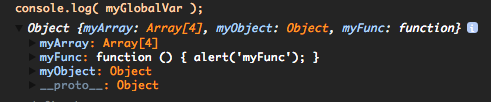
A Few Lessons I’ve Learned:
Think about other devs coming behind you..
jQuery.ready(function(){});=== bad-
// This is better..
myGlobalVar.init = function( $ ) {
    // Do stuff...
}
// the init method is reachable by other devs
jQuery.ready( myGlobalVar.init );
A Few Lessons I’ve Learned:
An Aside: The difference between array and objects
-
// This is an array
WDSLunch.myArray = ['zero', 1, 'two', 3];
// WDSLunch.myArray[0] == 'zero'
-
// This is an object WDSLunch.myObject = {'zero' : 0, 1 : 'one', 'two' : 2, 3 : 'test'}; // WDSLunch.myObject['two'] === 2 (can also use WDSLunch.myObject.two) -
// This is an array of objects WDSLunch.myObjectArray = [ {'zero' : 0}, {1 : 'one'}, {'two' : 2} ]; // WDSLunch.myObjectArray[1] === {1 : 'one'} - An object can have named keys, array keys are strictly numeric.
Best Practice One-offs:
Best Practice One-offs:
- Use jQuery’s ‘on’ over direct method call equivalent.
$('body').on( 'click', '.button', function(){}) > $( '.button' ).click(function(){}) - Avoid
.css()(and even.show()and.hide()).. Better to keep your css in your .css, and add/remove classes.$('.button').removeClass( 'hide' ).addClass( 'show class-for-styling' ); - Always use the var keyword (or window.varName). Avoid polluting global space.
function myFunc() {
    var text = 'my text';
}
Best Practice One-offs:
- Return early and often. Functions/methods should have one job. Nested conditionals should be avoided.
getString() { if ( ! conditionMet ) { return ''; } // other stuff } 
Best Practice One-offs:
- Cache your selectors early and often (we use a
$at the front of these variables to indicate a jQuery object).var $body = jQuery( 'body' ); var $content = $body.find( '.content' ); var clickHandler = function( event ) { event.preventDefault(); // do stuff... } $content.on( 'click', '.click-me', clickHandler );(because DRY = Don’t repeat yourself!)
'use strict';(no really…use'use strict';)
Demo Time
Resources
- 3 ways to define a JavaScript class
- 5 Advanced Javascript and Web Debugging Techniques You Should Know About
- 7 JavaScript Basics Many Developers Aren’t Using (Properly) (reposted on this site as the site is currently down)
- 10 Ways to Instantly Increase Your jQuery Performance
- 14 Handy jQuery Code Snippets for Developers
- Learn JavaScript Properly (For NON-JavaScript Programmers and First-time Programmers), 6-8 week course
- Self-Executing Anonymous Functions
- Self-Executing Anonymous Functions or How to Write Clean Javascript
- Style in jQuery Plugins and Why it Matters
- Writing Better jQuery Code
- Keeping jQuery in Check (Segregated DOM makes for a maintainable JavaScript codebase)
- Fixing These jQuery! – A Guide to Debugging
- JavaScript Weekly – A free, once–weekly e-mail round-up of JavaScript news and articles.
- Avoiding anonymous JavaScript functions
- You Don’t Need the DOM Ready Event
- jQuery Events: Stop (Mis)Using Return False
More (and advanced) Resources
- JSbooks – The best free JavaScript resources
- Object-orientation and inheritance in JavaScript: a comprehensive explanation
- Object Creation in JavaScript – a funfunfunction playlist
- SOLID JavaScript In A Wobbly (World Wide Web)
- Corey Frang – Scoping JavaScript Scope
- Why do we call jQuery(document.getElementById(‘selector’))? (instead of jQuery( ‘#selector’ ) )
- jQuery selector cache
- Performance recommendation: Do not use jQuery’s hide() method. Ever. Classes are your friend.
- Getting Some Closure – Best practices in JavaScript and jQuery for WordPress
- Multiple var statements in JavaScript, not superfluous
- Learning JavaScript Design Patterns – entire book
- A nifty function for namespacing
- Avoiding anonymous JavaScript functions
- Gentle explanation of ‘this’ keyword in JavaScript (and great video)
- Scott Bolinger did a blog post version of this presentation on the AppPresser blog.
- Because you got this far, I <3 u.